
TechResolve Hosting
  • Nederlands Nederlands
    العربية العربية Nederlands Nederlands English English
  • $ USD
    $ USD Є EURO ج.م EGP
  • Mijn TechResolve
  • 0
TechResolve Hosting
  • Nederlands
    العربية العربية Nederlands Nederlands English English
  • E-mailhosting
  • Domeinen
    • Belangrijkste functies
      • Domeinbeheer

      • Privacybescherming

      • Domeinoverdrachtsdiensten

      • 24x7 ondersteuning

      • Domeinnaamregistratie

      Vanaf 10 EUR
      Domeinen
      Jouw toegangspoort tot digitale identiteit
      • Nieuw domein
      • Domein registreren
      • Domein Overdragen
  • Hosting
    • Topfuncties
      • Serverbronnen

      • Schaalbaarheid

      • Ondersteuning en onderhoud

      • Server-uptime

      • Back-up en herstel

      Vanaf 1 EUR
      Hosting
      Het versterken van je online aanwezigheid
      • Webhosting
      • WordPress-hosting
  • VPS-hosting
  • Over ons
    • Belangrijkste kenmerken
      • Overzicht van het bedrijf

      • Missie en Visie

      • Belangrijke mijlpalen

      • Team en Leiderschap

      • Aanbod van producten en diensten

      Over ons
      Over het bedrijf
      Het vormgeven van jouw zakelijke toekomst
      • Bedrijf
      • Restitutiebeleid
      • Privacybeleid
      • Algemene Voorwaarden
    • Key Attributes
      • 24*7 Availability

      • Multiple Contact Channels

      • Knowledgeable Staff

      • Timely Response

      • Remote Assistance

      Contact Us
      Support
      Round the Clock Support!
      • Ticket openen
      • Neem Contact Op
      • Kennisbank
      • Nieuws
  • Services
    • Website
      • Design a New Website
      • Need Custom Changes in Website
    • Whmcs Market Place Links
      • SSl Certificates
      • Website Builder
      • Site Lock
      • Email Services
      • Website Backup
  • E-mailhosting
  • Domeinen
    • Domeinen
      • Nieuw domein
      • Domein registreren
      • Domein Overdragen
  • Hosting
    • Hosting
      • Webhosting
      • WordPress-hosting
  • VPS-hosting
  • Over ons
    • Over het bedrijf
      • Bedrijf
      • Restitutiebeleid
      • Privacybeleid
      • Algemene Voorwaarden
    • Support
      • Ticket openen
      • Neem Contact Op
      • Kennisbank
      • Nieuws
  • Services
    • Website
      • Design a New Website
      • Need Custom Changes in Website
    • Whmcs Market Place Links
      • SSl Certificates
      • Website Builder
      • Site Lock
      • Email Services
      • Website Backup
Aanmelden Registreer Nu
NederlandsNederlands
العربية العربية Nederlands Nederlands English English
$ USD
$ USD Є EURO ج.م EGP
  1. Klantensysteem Home
  2. Kennisbank
  3. Plesk
  4. CloudLinux (Plesk)
  5. How to Change the PHP Version via CloudLinux Selector in Plesk

How to Change the PHP Version via CloudLinux Selector in Plesk PDF weergeven

  • 0


You can use CloudLinux's Select PHP Version to change your website's PHP Version. CloudLinux provides various PHP Versions to choose from.


1. Log in to your Plesk account.

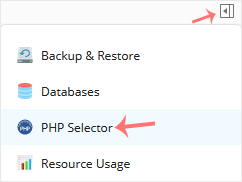
2. Click on the Pull icon in the right sidebar and choose PHP Selector.
 

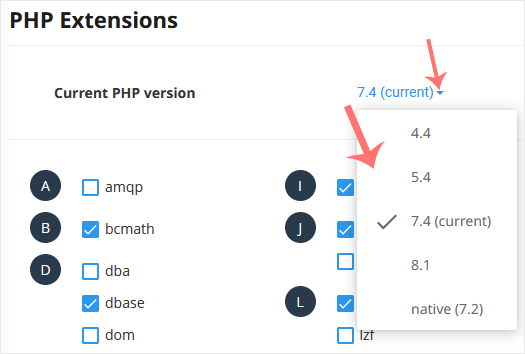
3. To the right side of the Current PHP version, click on the drop-down menu and choose the version you want to use.
 

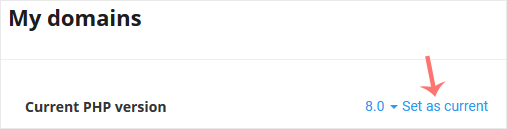
4. Click Set as current.


Was dit antwoord nuttig?

Gerelateerde artikelen

How to Increase PHP's post_max_size Value Using CloudLinux's Selector in Plesk   You can modify PHP post_max_size as per your needs using CloudLinux PHP Selector in Plesk.... How to Increase PHP's upload_max_filesize Value Using CloudLinux Selector in Plesk   You can modify PHP's upload_max_filesize as per your needs using CloudLinux's PHP Selector in... How to Enable or Disable PHP's display_errors via CloudLinux Selector in Plesk   Sometimes, we need to debug PHP. Hence, we need to enable display_errors or disable them for... How to Enable or Disable PHP Extensions Using the CloudLinux Selector in Plesk   You can use CloudLinux Selector to enable or disable available PHP extensions in Plesk.   1.... How to Increase or Decrease PHP Memory Limit via CloudLinux Selector in Plesk   You can modify PHP Memory Limit as per your needs using CloudLinux PHP Selector in Plesk....
« Terug

Powered by WHMCompleteSolution

  Categorieën

4
Back-up/Herstellen
10
Beveiliging
9
Cloudflare (cPanel)
10
CloudLinux (cPanel)
24
cPanel - Configuratiescherm
11
Databases
48
DirectAdmin
6
DNS - Nameservers
10
Domeinbeheer
17
E-mail
6
Een configuratiescherm installeren
9
FTP
8
Mailfilters & SPAM
11
Mobiel
3
Overige
7
PayPal
47
Plesk
58
SiteWorx (Configuratiescherm)
69
Softaculous
19
SolusVM
5
SSL
19
Virtualizor
17
WHM
17
WordPress

  Categorieën

  Ondersteuning

  Mijn Support Tickets   Nieuws & Aankondigingen   Kennisbank   Downloads   Netwerk status   Maak een helpticket aan

Laden...
Laden...
Kies taal
العربية
Nederlands
English

Kies valuta

$ USD
Є EURO
ج.م EGP

Genereer wachtwoord

Voer een wachtwoord in dat uit 8 tot maximaal 64 tekens bestaat.